How to upscale Midjourney images for print (300 DPI, Etsy-ready)

The short answer: Midjourney's current version, V8.2, makes a square image at 1024 × 1024 pixels, and its Subtle or Creative upscaler doubles that to 2048 × 2048. Turning on HD mode gets you 2048 px straight away, and HD images cannot be upscaled further inside Midjourney (Midjourney docs). A sharp print needs about 300 pixels per inch, so 2048 px covers 6.8 inches, which Midjourney's own resolution guide spells out. For an 8×10 you need roughly 3× the standard 1024 px image; for 16×20 about 6×; for 24×36 about 10×. That is the job of a separate AI upscaler, and the rest of this guide is how to do it well.
How many pixels a print needs
The rule is inches × 300. Changing the DPI number in a file's settings without adding pixels does nothing for sharpness. Midjourney's guide makes the same point and notes that posters viewed from a distance can get away with 150 DPI. The table below assumes 300 DPI and a square Midjourney image cropped to the print's shape, so the long side of the print has to be covered by the full width of the source.
| Print size (inches) | Pixels needed at 300 DPI | Enlargement from 1024 px | Enlargement from 2048 px |
|---|---|---|---|
| 8×10 | 2400 × 3000 | 2.9× | 1.5× |
| A4 (8.3×11.7) | 2480 × 3508 | 3.4× | 1.7× |
| 11×14 | 3300 × 4200 | 4.1× | 2.1× |
| A3 (11.7×16.5) | 3508 × 4961 | 4.8× | 2.4× |
| 16×20 | 4800 × 6000 | 5.9× | 2.9× |
| A2 (16.5×23.4) | 4961 × 7016 | 6.9× | 3.4× |
| 18×24 | 5400 × 7200 | 7.0× | 3.5× |
| 24×36 | 7200 × 10800 | 10.5× | 5.3× |
Upscalers work in fixed steps, usually ×2, ×4, ×8 and ×16, so pick the first step at or above the number in the table and scale down to the exact size afterwards. Scaling down never costs sharpness. In practice: from a 1024 px image, ×4 (4096 px) covers up to about 13.6 inches and ×8 (8192 px) up to about 27 inches. From a 2048 px image, ×4 already gives you 8192 px.
If you generate in portrait, the numbers shift in your favour. At 2:3 Midjourney gives 896 × 1344 standard and 1792 × 2688 upscaled, per the same docs table, and 2:3 is exactly the shape of 12×18, 16×24 and 24×36 prints.
The workflow, step by step
1. Get the biggest file Midjourney will give you
Use Upscale (Subtle) on the image you want to sell, or generate it in HD. Both end at 2048 px on a square image. Starting an external upscale from 2048 px instead of 1024 px means the AI has four times as many real pixels to work from.
Subtle and Creative both double the size. Midjourney describes the difference plainly: Subtle "keeps changes to a minimum", while Creative "will change your image a bit as it adds new details" (docs). Creative can fix an awkward hand, but it can also change the face or pattern you picked the image for. Run Creative when you want a second roll of the dice, and Subtle when you want the image you already approved. Upscales use GPU minutes and can cost twice as many as the original generation.
2. AI-upscale by ×4 or ×8
A normal resize, such as Photoshop's Image Size with Bicubic or exporting a small image into a large canvas, only spreads the existing pixels further apart and blends between them. Edges turn soft and textures go mushy, because no new detail is created. An AI upscaler is a model trained on pairs of small and large images. It predicts what the missing detail should look like: crisp line edges, brush texture, fabric weave.
The model matters as much as the tool. Models trained on photos and paintings keep texture. Models trained on flat digital art and anime clean up surfaces and sharpen lines, which is ideal for vector-looking art and clip art but will polish away paper grain or canvas texture you wanted to keep. The open-source Real-ESRGAN project, for example, ships a general model and a separate one optimised for anime images. If your tool offers both, try both on a crop.
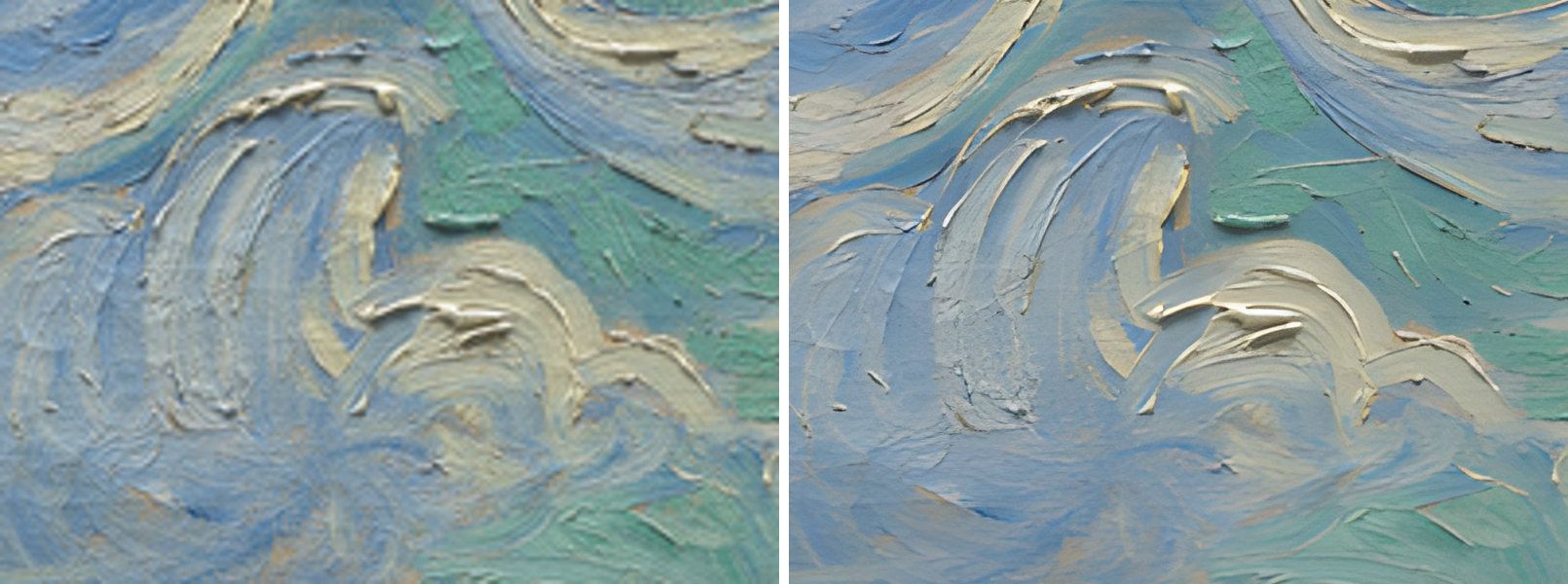
Detail of Wheat Field with Cypresses by Vincent van Gogh, The Met, public domain. General-art model.
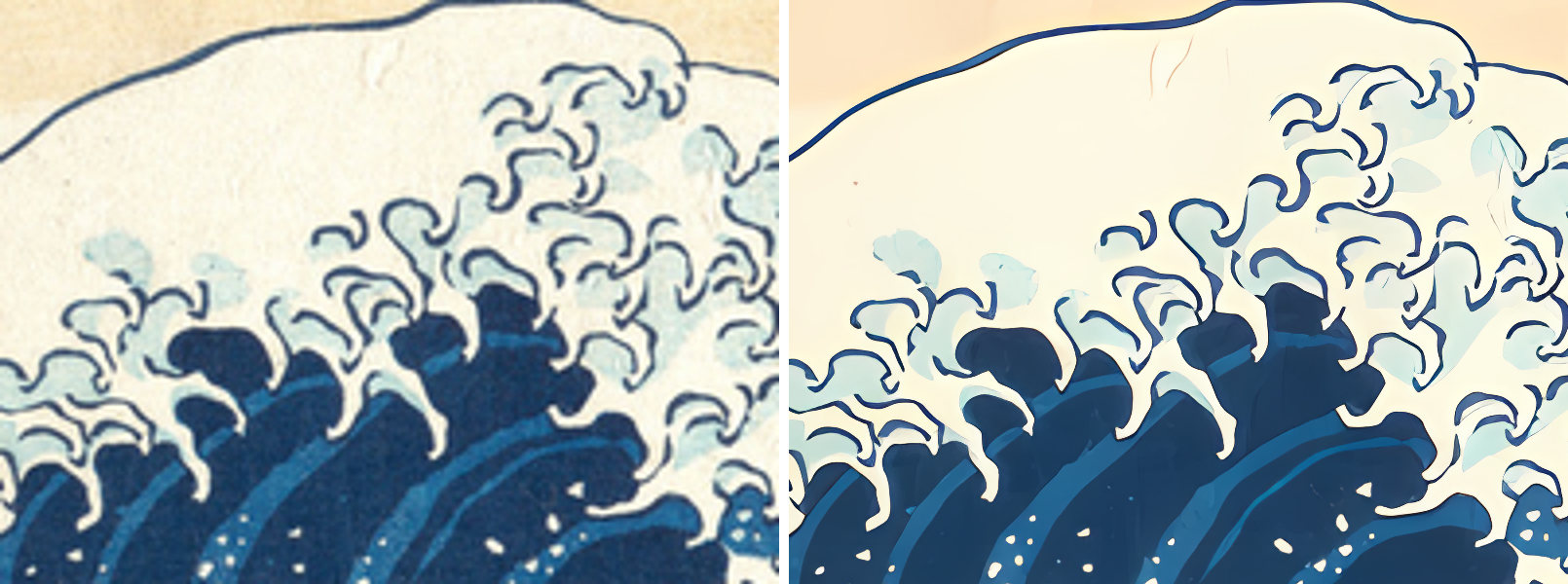
Detail of The Great Wave by Katsushika Hokusai, The Met, public domain. Flat-art model: cleaner lines, and the paper grain is gone.
3. Check it at 100% zoom
Open the result and look at it at actual pixels, not fitted to the screen. The places AI upscalers go wrong are predictable:
- Faces and hands, where the model can invent odd shapes or plastic skin.
- Text and lettering, which can turn into near-letters.
- Fine repeating patterns, such as lace, brickwork or hatching, which can smear or grow seams.
If something is off, try the other model, or go back to Midjourney and fix it there before upscaling again.
4. Crop to your print ratios
Print sizes come in a few shape families: 2:3 (4×6 up to 24×36), 3:4 (up to 18×24), 4:5 (8×10, 16×20), 11×14 on its own, and the ISO A sizes. One file per family fits neatly within Etsy's limit of five files per digital listing. Crop each file in an image editor from the upscaled master, and check that nothing important sits near an edge that gets cut. Generating in the right shape in the first place, with Midjourney's aspect ratio setting, saves you from cropping away half the composition.
5. Export JPEG, sRGB, high quality, 300 DPI, under 20 MB
- JPEG, sRGB. Buyers print at home or at a print shop, and sRGB is the safe common ground. Etsy's list of supported download types includes .jpg and .png but not .webp (Etsy Help).
- High quality without chroma subsampling. JPEG can store colour at lower resolution than brightness (chroma subsampling), which blurs sharp colour edges such as red lettering. If your exporter offers 4:4:4, use it.
- 300 DPI in the file. It changes no pixels, but some print shops and buyers check it.
- Under 20 MB per file. That is Etsy's limit for each digital file, up to five files per listing. The largest sizes at 300 DPI can go over it. Lower the quality a notch for that one file rather than shrinking it.
Upscaler options, as of September 2026
| Tool | What it is | Price | Where it runs |
|---|---|---|---|
| Midjourney Upscale (Subtle / Creative) | Built-in 2× step, stops at 2048 px on a square | Included in any plan, uses GPU minutes; plans from $10 a month (plans) | Cloud |
| Topaz Gigapixel | Desktop upscaler for Mac and PC with several models | Subscription only since 3 October 2025 (CG Channel); $29 a month or $149 a year, Pro $499 a year for businesses over $1M revenue (pricing) | Local, with optional cloud rendering |
| Upscayl | Free, open-source (AGPL-3.0) desktop app for Windows, macOS and Linux | Free; the makers also run a separate Upscayl Cloud service (upscayl.org) | Local; needs a Vulkan graphics card, and its README warns many integrated GPUs do not work |
| Let's Enhance | Web upscaler | 10 free credits with a watermark and 8 MP output cap; Starter $9 a month billed annually for 100 images (pricing) | Cloud |
| Canva Upscale | One-click upscale inside the Canva editor | On Free (draws from your AI allowance) and paid plans; picks 4× or 16× itself, output capped at 50 megapixels, once per image (Canva Help) | Cloud |
| AlphaUpscale | Our Windows app, see below | 20 images free, then $29 a year or $4 a month | Local |
Canva's 50 MP cap is worth knowing before you plan a big poster: a square image at 8192 px is 67 MP, so it is out of reach there. Cloud tools mean uploading your art and working within credits; local tools mean your own graphics card does the work, as fast as that card allows.
The "fake 8×" check
To reach ×8, some upscalers run one AI ×4 pass and then do a plain ×2 resize on top. The result is 8× the pixels but only 4× the detail, and the last doubling has exactly the softness described in step 2.
You can test any tool yourself. Make a ×8 version, then make a ×4 version with the same tool and enlarge it 2× in an ordinary editor with bicubic resampling. Open both at 100% on the same area and look at thin lines and edges. If they look the same, the tool's ×8 was a ×4 plus a resize. A real second AI pass gives edges that stay crisp at the final size instead of blurring.
Where AlphaUpscale fits
We built AlphaUpscale for this exact workflow. It is a Windows 10 and 11 app that runs Real-ESRGAN models on your own graphics card, Intel, AMD or NVIDIA, including the integrated graphics in recent laptops. Nothing is uploaded, and there are no credits or monthly caps. The first 20 images are free, with no account; after that it is $29 a year or $4 a month.
Sizes are exact multiples: ×4 is one AI pass, and ×8 and ×16 run the AI twice. A 1024 px Midjourney image becomes 4096, 8192 or 16,384 px. It has a general-art model and a flat-art/anime model, which made the two comparisons above. Output is JPEG with no chroma subsampling, sRGB and 300 DPI, at quality 95, 92, 90 or 88, or PNG or WebP. A file up to 8192 px that goes over Etsy's 20 MB gets a warning mark; the app never recompresses or shrinks it behind your back.
What it does not do yet: crop to print ratios. You still need an editor for step 4. It is also Windows only.
We make one of the tools in the table, so weigh our view accordingly. Every price and limit above links to the maker's own page.
Frequently asked
What size is a Midjourney image? In V8.2, 1024 × 1024 px for a standard square image and 2048 × 2048 px after Upscale Subtle or Creative, or in HD mode. Other shapes vary, for example 1792 × 2688 for an upscaled 2:3 portrait.
Can I just set a Midjourney image to 300 DPI? You can, but a 2048 px image at 300 DPI only prints 6.8 inches wide. For bigger prints you need more pixels, which means an upscaler.
Is ×4 enough for Etsy wall art? From a 2048 px image, ×4 gives 8192 px, about 27 inches on the long side at 300 DPI: enough for 18×24, not for 24×36. From a 1024 px image, ×4 (4096 px) covers 8×10 and A4; for 11×14 and up, go ×8.